LLM Integration
Integrating Large Language Models (LLMs) into Your Swarm
You can install an LLM (Ai) on a local server on your network and have your swarm interact with it. This allows you to leverage the capabilities of the LLM for various tasks such as creating graphs and workflows based on your prompts or generating graphical dashboards to view your systems.
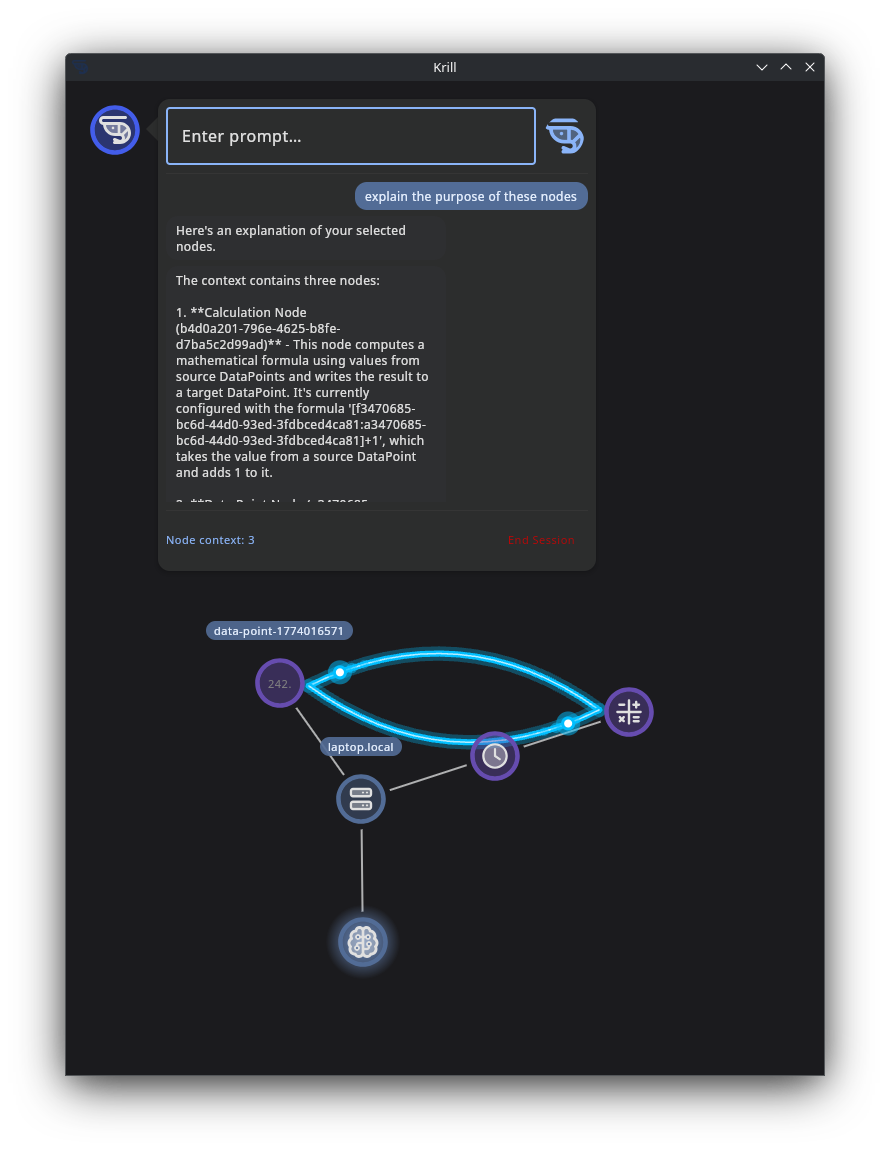
It’s easy to install Ollama on a local machine with a decent GPU, and it provides a simple interface to run LLMs locally. By following the steps outlined below, you can set up an LLM server that your swarm can interact with for enhanced functionality.
Just install Krill Server on the same computer and add an LLM Node with the port and model you are running. Krill can perform basic natural language understanding and generation tasks, but the LLM can provide much deeper reasoning, code generation, and multimodal capabilities that Krill can leverage through structured prompts and iterative interactions.
To integrate an LLM into your swarm, you can follow these steps:
- On computer with a decent GPU, install Ollama: https://ollama.com/download (it’s very easy, just run one script and you’re done). Ollama allows you to run LLMs locally on your machine.
- Run ollama with this recommended model if you have a good GPU
ollama run LESSTHANSUPER/THE_OMEGA_DIRECTIVE-Mistral_Small3.2-24b:Q3_K_S - Then just run
ollamato start the LLM server. You can replaceclaude-codewith the name of the model you installed if you chose a different one. - Experiment with models that are good at what you want to do. For example, if you want to generate graphs and workflows, you might want to try models that are good at understanding and generating code or diagrams.
We’re just getting started and would love to hear what you’d like to see Krill do with LLMs. The possibilities are vast, and we’re excited to see how you leverage this powerful integration in your swarms!
Local LLM Recommendations for Krill
Krill works best when the model can stay warm in VRAM, the prompt stays structured, and the LLM has enough context to iterate with the Krill server over one or more follow-up calls. Ollama supports NVIDIA GPUs with compute capability 5.0+ and driver 531+, including RTX 40-series and RTX 50-series cards. Its default context sizing is VRAM-based: under 24 GiB defaults to 4k, 24–48 GiB defaults to 32k, and 48+ GiB defaults to 256k. Ollama also recommends at least ~32k context for search/agent-style workloads and 64k+ for larger coding-style agent loops. :contentReference[oaicite:0]{index=0}
Recommended models by GPU tier
Small GPU / laptop iGPU / older NVIDIA (roughly 6–10 GiB VRAM)
Use these when the priority is responsiveness and broad compatibility, not maximum reasoning depth.
gemma3:4bllama3.2:3bgemma3n:e4b
Why these:
- Gemma 3 is available in compact sizes including 4B and is multimodal with a 128k context window. :contentReference[oaicite:1]{index=1}
- Llama 3.2 text models are available in 1B and 3B sizes and are positioned for dialogue, retrieval, and summarization. :contentReference[oaicite:2]{index=2}
- Gemma 3n is designed for everyday devices and lower resource requirements. :contentReference[oaicite:3]{index=3}
Best Krill use cases:
- “Explain this sensor error”
- “Summarize these node states”
- “Turn this natural language request into a first draft of logic”
Mid-range NVIDIA GPU (roughly 12–16 GiB VRAM, e.g. 4060 Ti / 4070 / 4080 Laptop-class)
Use these when you want a stronger general-purpose assistant that can still run locally with decent speed.
gemma3:12bdeepseek-r1:14bqwen3:14bor similar mid-size Qwen3 family variant if available in your setup
Why these:
- Gemma 3 ships in 12B and 27B sizes and is a strong general-purpose local option. :contentReference[oaicite:4]{index=4}
- DeepSeek-R1 has 7B, 8B, 14B, 32B, 70B and larger variants in Ollama; the 14B tier is a good local-reasoning compromise. :contentReference[oaicite:5]{index=5}
- Qwen3 is available as a family ranging up to 30B and 235B, with smaller family variants suited to local deployment. :contentReference[oaicite:6]{index=6}
Best Krill use cases:
- multi-step troubleshooting
- drafting logic gates from a plain-English request
- proposing an SVG dashboard schema before refining it with follow-up calls
Strong single-GPU desktop or high-end laptop (roughly 24 GiB VRAM, e.g. 4090 / 5090 Laptop)
This is the sweet spot for Krill’s local agent workflows.
mistral-small3.2:24bqwen3:30bif you want a stronger model and your latency budget allows itdeepseek-r1:32bif your focus is reasoning over speedgemma3:27bif you want a capable multimodal generalist
Why these:
- Mistral Small 3 / 3.2 is a 24B-class model and is specifically described by Ollama as fitting on a single RTX 4090 once quantized. :contentReference[oaicite:7]{index=7}
- Qwen3 includes a 30B model in Ollama. :contentReference[oaicite:8]{index=8}
- DeepSeek-R1 includes a 32B tier in Ollama. :contentReference[oaicite:9]{index=9}
- Gemma 3 includes a 27B model and is described by Ollama as “the current, most capable model that runs on a single GPU.” :contentReference[oaicite:10]{index=10}
Best Krill use cases:
- complex logic synthesis with back-and-forth clarification
- generating SVG dashboards from selected nodes and metadata
- longer prompt mediation where Krill enriches the request with node docs, state, and schema
Very large VRAM / multiple GPUs / server-class
Use this tier only if you already know you need it and can tolerate slower cold starts and larger memory footprints.
qwen3:30btoqwen3:235bdeepseek-r1:70b- very large reasoning/coder models only if your deployment is explicitly built around them
Why:
- These are available in Ollama, but they are overkill for most Krill tasks unless you are pushing long agent loops, large code generation, or very heavy reasoning. :contentReference[oaicite:11]{index=11}
My practical recommendation
If you want one default recommendation per tier:
- Lightweight:
gemma3:4b - Balanced:
deepseek-r1:14b - Best single-GPU Krill model:
mistral-small3.2:24b - Higher-reasoning single-GPU option:
deepseek-r1:32b - Best multimodal option:
gemma3:27borqwen3-vlif the workflow truly benefits from images; Qwen3-VL requires Ollama 0.12.7 or newer. :contentReference[oaicite:12]{index=12}
Example prompt patterns for Krill
These are written as realistic user prompts. In practice, Krill can add node metadata, state, schema hints, and selected node context before sending the request to the local model.
1) Sensor troubleshooting
Initial prompt
Explain why this sensor is reporting an error. Use the selected nodes and their recent state. Tell me the most likely cause first, then ask Krill for the next details you need.
Likely follow-up from the model
I need the last 20 readings, the node type, units, error text, and whether any upstream digital or analog source is providing out-of-range values.
Krill follow-up prompt
Here are the last 20 readings, the node class, and the upstream dependencies. Re-evaluate and produce:
- most likely cause
- second most likely cause
- specific checks the user can perform
Good outcome
- clear explanation in plain English
- probable fault tree
- concrete next checks
- no hallucinated hardware assumptions
2) Logic gate generation
Initial prompt
Create a series of logic gates that will turn Raspberry Pi pin 17 on when either DoorOpen or MotionDetected is true, but only if Armed is true and WaterLeak is false. Ask Krill for any missing details before finalizing.
Likely follow-up from the model
I need the exact node ids, whether the inputs are already boolean, whether any values need inversion, and whether you want edge-triggered or continuously evaluated behavior.
Krill follow-up prompt
Inputs are boolean. Use these node ids. WaterLeak should be inverted. Behavior should be continuously evaluated. Return the proposed logic graph as a concise structured plan first, then a user-friendly explanation.
Good outcome
- asks for missing semantics
- returns a graph or step list before code/config
- clearly identifies inversion and gating
3) SVG dashboard generation
Initial prompt
Create an SVG dashboard for the selected nodes. Use a clean dark theme. Show tank temperature, pH, water level, pump status, and a warning banner if any node is in an error state. Ask Krill for missing dimensions or node metadata if needed.
Likely follow-up from the model
I need node labels, preferred width/height, units, warning colors, and whether live values should be embedded as placeholders or concrete current values.
Krill follow-up prompt
Width is 1200, height is 700, use placeholders for live values, units are included in the provided node metadata, and warning color should be amber. Return only SVG.
Good outcome
- asks for dimensions before drawing
- keeps output constrained
- uses placeholders where dynamic binding is expected
4) Safe automation review
Initial prompt
Review this requested automation and tell me if it is safe: open the solenoid when TankLow is true and close it when TankHigh is true. Consider race conditions, missing fail-safes, and sensor disagreement.
Likely follow-up from the model
I need to know whether both sensors can be active at once, what the default solenoid state should be after reboot, and whether there is a timeout or manual override node available.
Krill follow-up prompt
Both sensors can be active at once during turbulence. Default state after reboot should be closed. There is a manual override node and a watchdog timeout node. Produce a safer design.
Good outcome
- surfaces failure modes
- asks for reboot/default behavior
- proposes watchdogs and override logic
5) “Teach me what’s happening” mode
Initial prompt
Explain this node graph to me as if I were new to Krill. Start with what the selected nodes do, then explain how state flows through the graph, then suggest one improvement.
Good outcome
- converts raw metadata into a human explanation
- useful for documentation and onboarding
- ideal for smaller models too
Prompting tips for Krill
Structure prompts in layers
A reliable pattern is:
- user intent
- selected node ids
- short metadata summary
- current relevant state
- constraints on the output
Example:
User goal: create an SVG dashboard
Selected nodes: …
Metadata: …
Current values: …
Constraints: return only SVG, width 1200, dark theme
Ask the model to request missing information
For Krill, prompts work better when the model is allowed to say:
“I need these 3 details before I can finish.”
That is usually better than forcing a one-shot answer.
Reuse stable prefixes
Keep the system message and the metadata format stable. This improves cache reuse when the user iterates on a task.
Default to smaller context than you think
Even though Ollama can scale context with VRAM, most Krill tasks do not need the largest available window. Ollama’s defaults are VRAM-based, but for practical agent workflows you should set context intentionally. :contentReference[oaicite:13]{index=13}
Suggested defaults:
- 16k for normal Krill use
- 32k for larger node sets or more back-and-forth
- 64k+ only for heavy coding/agent workloads
Constrain the output
Say exactly what you want back:
- “Return only SVG”
- “Return JSON with fields x, y, z”
- “Return a concise plan first”
- “Do not invent node ids”
GPU and Ollama tips for users
Make sure the model is actually using the GPU
Do not assume Ollama is using the GPU just because the system has one.
Check: ```bash nvidia-smi -L ollama ps nvidia-smi
What you want to see:
nvidia-smi -L lists the GPU
ollama ps shows the model and ideally 100% GPU
nvidia-smi shows the Ollama process using VRAM during a request
Ollama documents GPU support and recommends using ollama ps to verify how much of the model is offloaded.
Prefer one loaded model and one active request to start
For a local Krill deployment, this is a strong baseline:
OLLAMA_KEEP_ALIVE=1h OLLAMA_NUM_PARALLEL=1 OLLAMA_MAX_LOADED_MODELS=1
This keeps the model warm and avoids multiple requests fighting over the same GPU. Ollama supports OLLAMA_KEEP_ALIVE and other server configuration through environment variables and systemd overrides.
Use /api/chat consistently
Krill-style workflows are usually better on /api/chat than /api/generate because the interaction is naturally multi-turn and message-based. Ollama documents both endpoints in its API intro.
If the GPU is detected but not usable
Symptoms:
nvidia-smi -L says no devices found
Ollama falls back to CPU
model loads very slowly and never shows VRAM use
Things to check:
correct NVIDIA driver installed
Secure Boot disabled if it is interfering with module loading
on RTX 50-series / Blackwell, use the open NVIDIA kernel modules on Linux
reboot after changing driver packages
Laptop-specific warning
On gaming laptops with dynamic / hybrid graphics, the GPU may exist but still not be available to Ollama until the driver path is correct. Some systems also behave differently in dGPU-only mode versus hybrid mode. Test with nvidia-smi -L before blaming Ollama.
Watch for context bloat
Large context windows consume VRAM. Ollama’s default context scales with VRAM, but larger is not always better. Use the smallest context that still supports the task.
Measure real performance, not just “it works”
For each Krill request, it helps to log:
model name
context size
prompt length
total latency
streamed token count
tokens/sec
whether the model was already loaded
That will tell you much more than a single nvidia-smi snapshot.
Suggested “known good” Ollama baseline for Krill [Service] Environment=”OLLAMA_HOST=127.0.0.1:11434” Environment=”OLLAMA_KEEP_ALIVE=1h” Environment=”OLLAMA_NUM_PARALLEL=1” Environment=”OLLAMA_MAX_LOADED_MODELS=1” Environment=”OLLAMA_CONTEXT_LENGTH=16384”
Then raise context per request when needed.
Good per-request override example:
normal requests: num_ctx=16384
larger node graphs / richer iterations: num_ctx=32768
Simple recommendation table Hardware Recommended starting model Why Small GPU / older laptop gemma3:4b light, useful, easy to run 12–16 GiB VRAM deepseek-r1:14b strong reasoning for modest hardware 24 GiB VRAM mistral-small3.2:24b excellent single-GPU Krill default 24 GiB VRAM, more reasoning deepseek-r1:32b stronger reasoning if speed is acceptable 24 GiB VRAM, multimodal gemma3:27b strong generalist with image support Very large setup qwen3:30b+ only if you know you need it Final recommendation
If you want one default model to recommend for serious local Krill users with a good NVIDIA GPU, use:
mistral-small3.2:24b
It is the cleanest balance of capability, single-GPU fit, and local usability for the kinds of tasks Krill is mediating.
::contentReference[oaicite:19]{index=19}